Reading time: about 14 minutes. A working definition of what “commission software” actually has to do, written for the Sales Ops, Finance, or RevOps leader who has to defend the purchase.
Most articles about commission software features read like a feature checklist printed from a vendor pitch deck. That is a problem, because the words on those slides have almost no shared definition. “Flexible plan builder” can mean a UI that supports four pre-baked plan types, or it can mean an engine that runs arbitrary SQL on a virtual set of credited transactions. “Automated calculations” can mean the system runs nightly, or it can mean a one-shot click that recalculates every rep, every plan, every period in seconds. The gap between those two definitions is the difference between software that saves you 10 hours a month and software that saves you 10 hours a week.
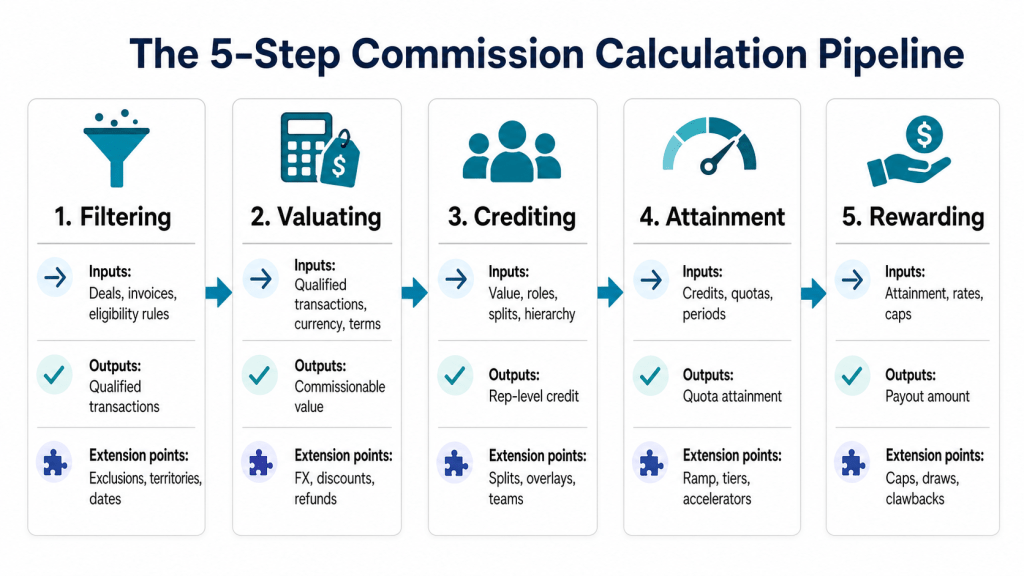
This is the long-form version of the question every commission-software shortlist eventually has to answer: what does the product actually have to do? We break it down into seven feature pillars, drawn from how a real commission engine is architected and from the realities Sales Ops teams hit on day 60 of ownership.
How a commission engine actually works
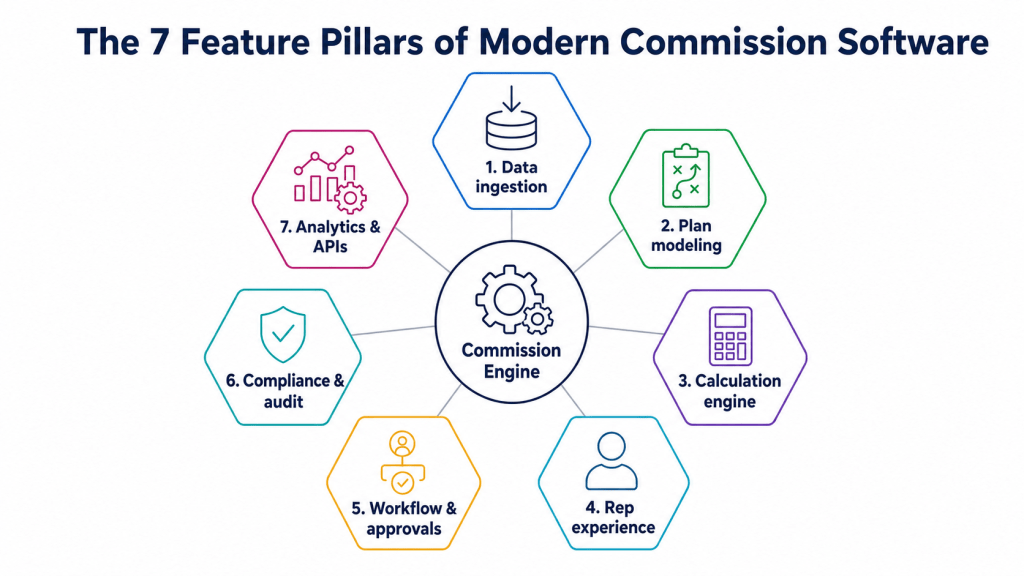
Strip the marketing language away and a commission engine is a structured pipeline that runs five sequential steps over a set of sales transactions, for a defined time period, against a defined plan, for a defined set of payees. Those five steps are filtering, valuating, crediting, attainment, and rewarding. Every product worth your time supports all five, with extension points at each step.
Filtering decides which deals are eligible to be commissioned. Valuating decides what number each deal is worth (revenue, margin, event count, points). Crediting decides who gets attribution (a rep, a team, multiple reps via splits). Attainment decides progress against a quota or threshold. Rewarding decides the payout. A platform that lets you customize all five of these steps independently is qualitatively different from one that exposes a wizard with seven plan templates. The architecture is described well in our deeper write-up on the structured framework of commission calculation.
The seven feature pillars
| Pillar | What the product must do | Why it matters |
|---|---|---|
| 1. Data ingestion | Import from CRM, ERP, billing, and flat files; keep field names intact; cross-lookup between sources. | If you have to flatten 12 fields into 5 to load them, you have already broken the audit trail. |
| 2. Plan modeling | Configure tiered, accelerated, split, draw, MBO, SPIF, and clawback logic with full version history. | Plans change mid-year. Without version history you cannot prove what was in effect on the day a deal closed. |
| 3. Calculation engine | Run one-shot recalculations across every rep, every plan, every period; preserve manual adjustments. | A platform that takes hours to recompute encourages people to stop recomputing. |
| 4. Rep experience | Per-rep dashboards with statements, deal drill-down, what-if calculators, and dispute submission. | Reps do shadow accounting when they cannot see how their number was built. |
| 5. Workflow & approvals | Enrollment with e-signature, plan-approval, statement-verification, and manager-approval workflows. | A signed acknowledgement before the period starts kills the most common dispute. |
| 6. Compliance & audit | Full audit log; plan version snapshots; ASC 606 / 340-40 amortization; role-based access; data residency. | SOX and ASC 606 require explainable, repeatable numbers. Spreadsheets cannot pass an auditor. |
| 7. Analytics & APIs | REST APIs for read, write, and bulk-upload; native connectors to BI tools; revenue analytics. | The data is more valuable when finance, BI, and FP&A can pull it without exporting CSVs. |
Pillar 1: Data ingestion
The most underestimated feature in the entire category. Commission engines do not generate sales data; they ingest it from CRM (deals, accounts, contacts, products), from billing or ERP (invoices, payments, refunds), from HRIS (employees, hire dates, terminations), and sometimes from flat files (manual adjustments, product catalogs, FX rates). A serious platform supports multiple data sources concurrently, preserves original field names so they can be referenced in plan logic, and supports cross-lookups, for example matching invoices to deals to determine which deals have been paid before commissions are released.
Three diagnostic questions separate real ingestion from “we have a CRM connector”:
- Can I import from at least 3 data sources concurrently and keep them logically separate?
- Can I reference a custom CRM field by its exact name inside a commission rule?
- Can I perform a cross-lookup between two sources (for example invoices to opportunities) inside the engine, not as a precomputed feed?
Pillar 2: Plan modeling
The plan modeling layer is where most pretty demos die in a production audit. A demo can show a clean accelerated plan with three tiers. A real production environment has 27 plans, 9 of which were created mid-year, 4 of which had quota adjustments on a per-rep basis, and at least one of which has a written exception that says “if product code starts with P, multiply commission by 1.5x.” If the modeling layer cannot represent all of those without exporting to a side spreadsheet, the platform is going to fail you exactly the way the spreadsheet was failing you. Our commission glossary defines every plan element your modeling layer must support.
Pillar 3: Calculation engine
Speed is not a vanity metric here. The reason fast calculation matters is behavioral: when a recalculation is fast (seconds to minutes), Sales Ops will rerun it after every plan change, every adjustment, every data correction. When a recalculation is slow (hours to overnight), Sales Ops will batch changes and ship them weekly, which means errors live in production for days at a time and reps spot them before Ops does. A one-shot recalculation that completes in minutes is how you get to the operating cadence that prevents disputes in the first place.
Pillar 4: Rep experience
Sales Cookie’s homepage benchmarks find that 62 percent of reps maintain shadow spreadsheets to verify their own commissions. Every one of those spreadsheets is a future dispute waiting for an excuse to be filed. The fix is not enforcement; it is transparency. A real rep dashboard shows the statement total, every deal that contributed to it, the plan element each deal triggered, every adjustment and its source, every accelerator threshold and how close the rep is to the next one, and a what-if calculator that lets the rep model the commission on an in-flight deal. When reps have all of that, the shadow spreadsheets disappear within two cycles.
Pillar 5: Workflow and approvals
The four workflows worth automating in a serious commission environment are enrollment, plan approval, statement verification, and manager approval. Enrollment captures the rep’s acceptance of the plan, with electronic signature and timestamped storage; in many U.S. states (notably California under Labor Code 2751) this written acceptance is a legal precondition for enforcement. Plan approval routes a new plan through Sales Ops, Finance, Legal, and the CRO before it goes live. Statement verification has Sales Ops sign off on each cycle’s calculated payouts before they are released to reps. Manager approval lets the front-line managers spot-check their team’s numbers and surface trouble before payroll runs.
Pillar 6: Compliance and audit
Compliance is the feature pillar that gets shorter air-time in demos and longer air-time in audits. Three concrete things to verify:
- Plan version snapshots. When you run a calculation, the system stores an immutable snapshot of the plan rules used. A year later, when an auditor asks “what was Plan X on March 4,” there is one answer.
- Per-change audit log. Every manual adjustment, plan edit, quota override, and rep-aliasing change is logged with user, timestamp, before-state, after-state.
- ASC 606 amortization. If you have multi-year contracts, the platform must capitalize and amortize the commission expense across the contract life, with reasonable schedules and easy reporting.
Pillar 7: Analytics and APIs
Even the most advanced commission engine will eventually be a data source for some BI tool downstream. Power BI, Tableau, Looker, ThoughtSpot, and dbt projects all expect to be able to read commission data via API or scheduled export. A platform that locks the data behind its own report builder forces you into a parallel reporting stack and is therefore unsuitable for any organization with a real analytics function. APIs should support read for every entity (calculations, credits, commissions, payouts), write for adjustments and quota updates, and bulk upload for transactions.
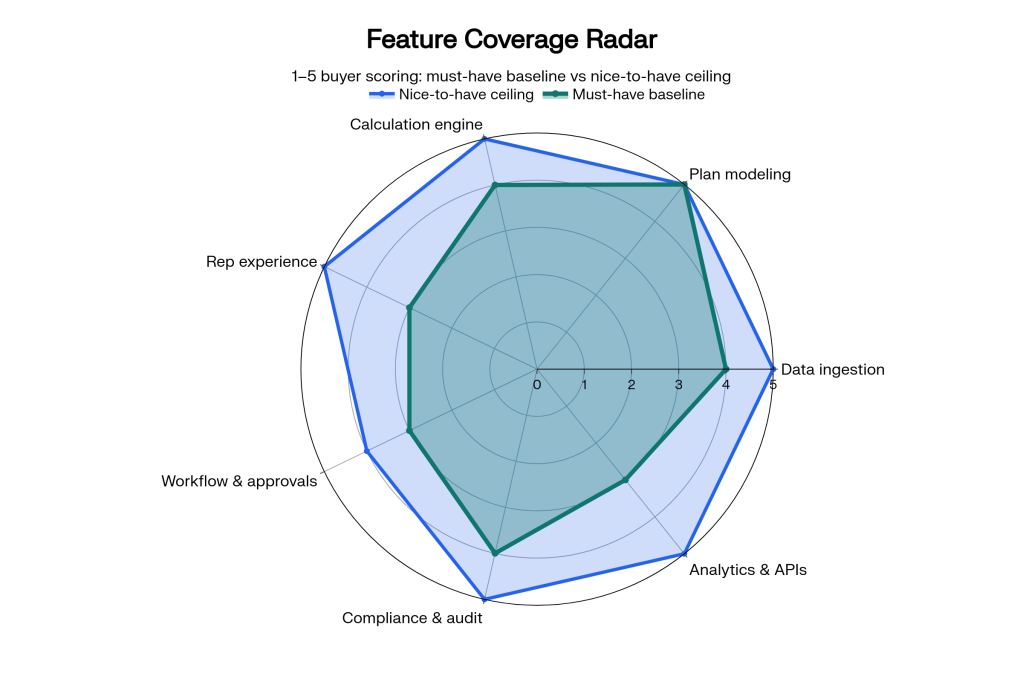
Must-have vs. nice-to-have feature matrix
| Feature | Must-have | Nice-to-have | Notes |
|---|---|---|---|
| Tiered and accelerated commission logic | Yes | If the engine cannot express a 3-tier accelerator natively, walk away. | |
| Splits and overlay credits | Yes | Required for any team with SE, CS, or overlay specialists. | |
| Manager plans / rollups | Yes | Manager override plans should be first-class, not bolted-on. | |
| Clawbacks (automatic) | Yes | Refunds, cancellations, and churn should trigger clawbacks without manual intervention. | |
| True-up commissions | Yes | Recalculation must net out previously-paid commissions. | |
| Estimated vs. paid commission tracking | Yes | Commission liability is a real GL line item. | |
| Recoverable advances / draws | Yes | Repayment automation, not a manual ledger. | |
| ASC 606 amortization | Yes (multi-year contracts) | Capitalize and amortize per ASC 340-40 guidance. | |
| Multi-currency | Yes (global teams) | For US-only teams | Including controlling what rep sees. |
| Workspaces / sandbox | Yes | Test plan changes before going live. | |
| Read-only admin roles | Yes | For finance, audit, and sandbox roles. | |
| Embedded BI dashboards | Yes | Good to have, but external BI is what matters. | |
| AI dispute triage | Yes | Sales Cookie offers AI-assisted dispute analysis to cut admin time. | |
| Mobile app for reps | Yes | Modern web UIs already work on mobile; native is a bonus. |
The features that quietly determine success
Beyond the feature matrix, two design choices end up driving more day-to-day satisfaction than anything else.
Time-dependent variables. Every commission-related number (quota, rate, OTE, threshold) should be modeled as a variable that can take different values for different time periods. Defining @@Quota once and letting the system pull January’s value for January and March’s value for March is qualitatively simpler than maintaining a per-month spreadsheet.
Native field-name preservation. When you import a deal from CRM, the engine should keep every original field exactly as named, and let you reference it inside commission rules. The opposite (forcing a fixed schema, dropping custom fields) is the design choice that breaks integrations a year after launch.
Bottom line
The right way to read a commission software feature list is to ignore the marketing nouns and ask one question per pillar: can this engine express my actual plan, on my actual data, at my actual cadence, with my actual audit and compliance load? If the answer is yes across all seven pillars, the platform is real. If it is yes on plan modeling and rep dashboards but no on data ingestion and APIs, you are buying a pretty front end that will not survive your second fiscal year.
See the seven pillars in one platform. Sales Cookie covers all of them in a single subscription, with no long-term commitment and a free trial that does not require a credit card. Pair this feature breakdown with our buyer’s guide and scorecard, our 90-day Excel migration plan, and our commission glossary.
Sources: Sales Cookie commission software checklist; Deconstructing sales commission software; FASB ASC 340-40; California Labor Code 2751; WorldatWork sales rewards research.

