Reading time: about 16 minutes. A buyer’s guide and scoring rubric for choosing commission software, written for the Sales Ops or Finance leader who will own the decision and the audit.
Commission software gets bought twice. The first purchase is the one finance approves. The second purchase is the one Sales Ops actually uses, six months later, after the platform has met live plan changes, mid-year quota updates, a finance audit, and at least one CRO who wants three brand new SPIFs by Friday. Plenty of teams have written the first check and then quietly returned to a spreadsheet because the platform could not survive the second purchase. The point of a structured buyer’s guide is to find a product that lives through both.
This is the procurement playbook we recommend: a 6-stage process, a scoring rubric across the seven feature pillars, and a demo checklist that exposes the gap between a polished demo and a production-ready platform. It is intentionally vendor-agnostic; you should be able to run it against Sales Cookie and anyone else in the market.
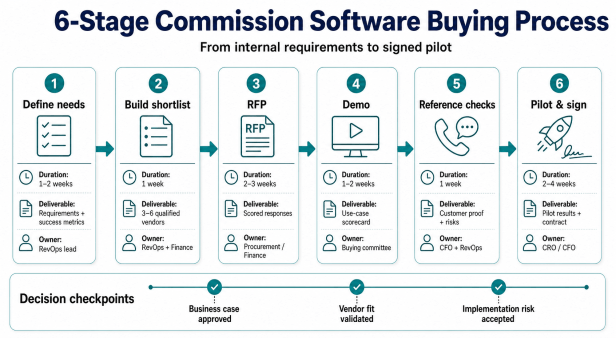
The 6-stage buying process
| Stage | Duration | Output | Owner |
|---|---|---|---|
| 1. Define needs & constraints | 1-2 weeks | Requirements brief, budget, timeline | Sales Ops |
| 2. Build a shortlist | 1 week | 3-5 vendor names | Sales Ops + Finance |
| 3. RFP & written response | 2-3 weeks | Side-by-side scoring sheet | Sales Ops |
| 4. Live demo & deep dive | 2 weeks | Demo notes, surprise findings | Sales Ops + Finance + IT |
| 5. Reference checks | 1 week | Customer interviews, support reviews | Sales Ops |
| 6. Pilot, contract, sign | 2-4 weeks | Signed agreement & kickoff | Finance + Legal |
Stage 1: Define needs and constraints
Before you talk to a vendor, write a one-page requirements brief that includes: number of payees today and projected in 24 months; number of distinct plans; number of data sources; required integrations (CRM, ERP, HRIS, BI); compliance load (SOX, ASC 606, multi-currency, multi-entity); and the must-have feature subset from our commission software feature pillars. The brief drives every other stage. Without it, the demos will be pretty and the result will be a software purchase the team does not use.
A useful exercise: ask each stakeholder what would have to be true 12 months from now for them to call the project a success. CRO answers might be “fewer rep escalations on commissions.” CFO answers might be “I can close the books in 5 days instead of 9 and pass an ASC 606 audit.” Sales Ops answers might be “I can roll out a mid-year plan change in one afternoon.” Each of those success criteria maps to a feature pillar, and that mapping becomes the scoring rubric.
Stage 2: Build a shortlist
Most teams over-survey the market and under-evaluate three vendors. Three to five is the right shortlist length. Sources for the shortlist: peer recommendations (LinkedIn Sales Ops communities), category reviews on G2 and Software Advice, and search results for “commission software” filtered by your company size. Eliminate vendors that require long-term contracts up front, vendors that will not show you a live calculation on your own sample data, and vendors that will not commit to a delivery timeline in writing.
Stage 3: The RFP and the scoring rubric
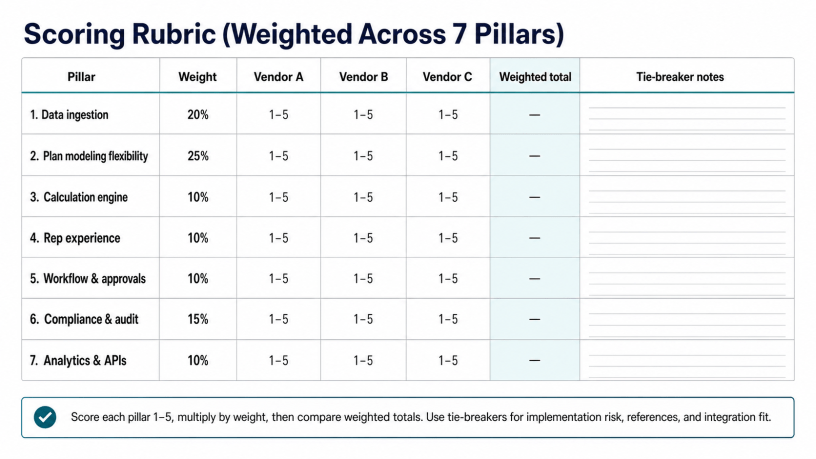
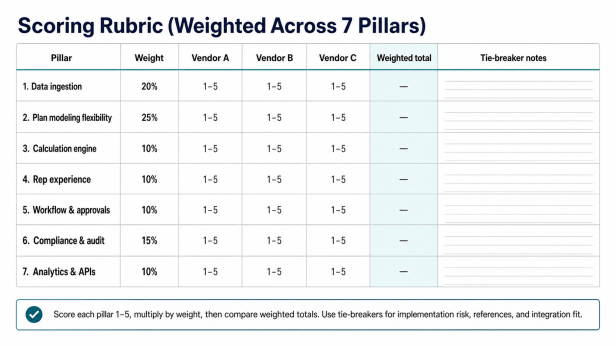
Send each shortlisted vendor a structured questionnaire. Score answers on a 1-5 scale against weighted pillars. A reasonable default weighting:
| Pillar | Default weight | Adjust if |
|---|---|---|
| Data ingestion | 20% | Increase if you have 3+ data sources or messy CRM data. |
| Plan modeling flexibility | 25% | Increase if you run 10+ plans or expect mid-year changes. |
| Calculation engine | 10% | Increase if you have 500+ reps or weekly recalcs. |
| Rep experience | 10% | Increase if dispute volume is your loudest pain. |
| Workflow & approvals | 10% | Increase if you have multi-step approvals or e-sign requirements. |
| Compliance & audit | 15% | Increase if SOX/public, multi-year SaaS contracts, or ASC 606. |
| Analytics & APIs | 10% | Increase if you have a real BI/data team or finance integration. |
Within each pillar, score the vendor’s answer on a 1-5 scale, multiply by weight, sum to a total. The vendor that “feels right” in the demo often does not score the highest, and that is the point of doing this on paper before you fall for the demo theater.
Stage 4: Live demo and deep dive
The single highest-value thing you can do during a demo is bring your own data. Send the vendor a sample of your real CRM and billing data (anonymized), one real plan document, and ask them to model the plan and calculate one cycle live on the call. Vendors who refuse, postpone, or “do it offline” are signaling that their wizard does not handle real-world data. Sales Cookie’s published commission software checklist is a good prompt list to bring to the demo.
The questions that separate strong vendors from weak ones tend to be specific:
- How do you program an exception such as “if product name starts with P, multiply commission by 1.5x”?
- If a transaction’s date is changed to a future period after it was already paid, does your system pay the commission again?
- Can you show me a transaction that crosses two tiers, and the blended rate explanation that gets sent to the rep?
- Can you automate clawbacks on refunds, without manual intervention?
- Can you do a cross-lookup between an invoice data source and a deal data source?
- If we move a rep mid-period from team A to team B, how does the system handle it?
- Show me the audit log for a manual adjustment, end-to-end.
- How do you take a snapshot of the plan rules used in calculation [Q2 calc, 2026]?
- How are recoverable advances automated?
- Can you require an electronic signature on plan acceptance, and is it timestamped?
Stage 5: Reference checks
Ask the vendor for a reference in your industry, in your size band, and crucially with at least one customer who has been live for 18+ months. The 18-month threshold matters: the first 12 months go well for almost everyone. Year two is when plan changes, scale, and audits expose the architecture.
Reference-call questions to ask, in priority order:
- How long did implementation actually take versus the original estimate?
- What was your dispute volume per 100 statements before and after?
- What happened the first time you had to add a brand new plan element mid-year?
- How does support escalate when a calculation is wrong and payday is tomorrow?
- What is the one thing you wish you had asked during the demo?
- How well does the platform handle your finance close cadence?
Stage 6: Pilot, contract, sign
The contracts side of the decision matters more than most buyers realize. Three things to negotiate:
- No long-term lock-in. Month-to-month or annual with reasonable cancellation. Vendors who require 3-year contracts up-front are betting on you being too stuck to leave. Sales Cookie’s positioning explicitly avoids “risky long-term commitments.”
- Per-user pricing that flexes both directions. Headcount goes both up and down. The contract should reflect that.
- Data portability clause. If you leave, you take your calculations, audit log, and configuration with you in a documented format. This is not optional for SOX-relevant data.
Demo-day checklist
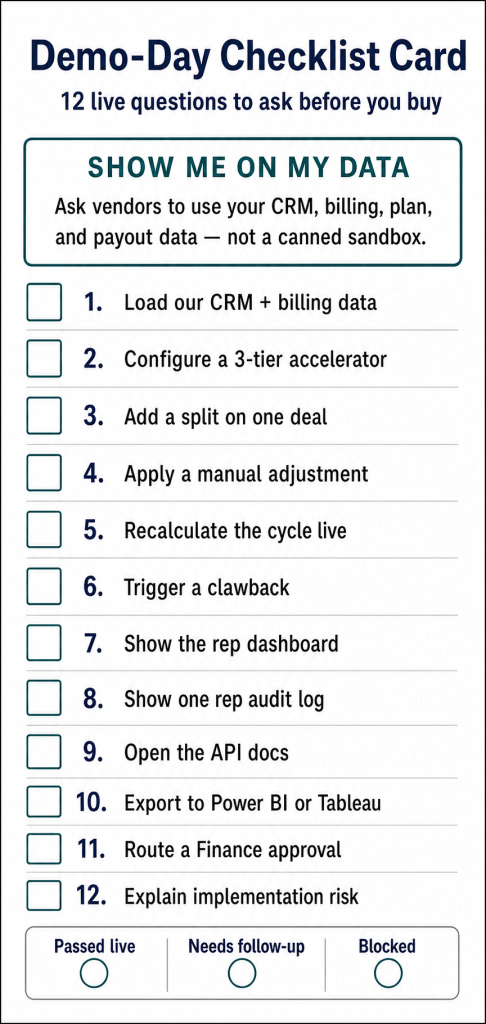
| Demo task | What you are looking for |
|---|---|
| Load a sample of our CRM and billing data live | Field names preserved; both data sources visible side-by-side. |
| Configure a 3-tier accelerator plan | Plan logic uses our field names; tiers configurable without code. |
| Add a split on one deal | Two payees credited correctly; rep dashboard reflects the split. |
| Apply a manual adjustment | Adjustment survives recalc; is logged with user/time/before/after. |
| Recalculate the cycle | Completes in seconds to minutes, not hours. |
| Trigger a clawback on a refunded deal | Clawback applies automatically based on plan rule, not manual override. |
| Show the rep dashboard | Per-deal breakdown, accelerator progress, dispute submission, what-if calc. |
| Show the audit log for one rep, one cycle | Every plan version, adjustment, recalc, manager override visible. |
| Open the API docs | Read, write, bulk-upload endpoints documented with examples. |
| Export to Power BI or Tableau | Live connector or scheduled extract, not a CSV-only escape hatch. |
Common buyer mistakes
- Shopping on pricing first. Commission software TCO is dominated by implementation labor and downstream dispute volume, not list price.
- Letting Finance or IT pick alone. Sales Ops is the daily operator. If the daily operator is not on the buying committee, you will buy the wrong thing.
- Skipping the live-data demo. Wizards always look pretty on a vendor’s sample dataset. Bring your own.
- Ignoring the audit log. SOX, ASC 606, and your eventual CFO change all turn the audit log into the most-used screen in the product.
- Signing a 3-year contract for a category that is moving fast. The AI features added in 2025 and 2026 are real; the platform that wins this year may not be the platform that wins three years from now.
Bottom line
A good commission software purchase looks boring from the outside. The Sales Ops lead made a one-page brief, the team scored three to five vendors against a weighted rubric, the demos were run on the company’s real data, the reference calls were detailed, the contract was annual with a data portability clause, and the platform went live in 60 to 90 days. A bad purchase usually starts with a demo and ends with a 3-year commitment to a wizard that cannot handle your second-year complexity. The 6-stage process exists to prevent the second outcome.
Score Sales Cookie on the same rubric. Use the questions above on us. Book a personalized demo with your data, get a 14-day trial with no credit card, and walk away if we do not score in the top three. Pair this guide with our feature pillars article, our why-automate ROI breakdown, and our spreadsheets-vs-software TCO post.
Sources: Sales Cookie commission software checklist; Sales Cookie comparison framework; HBR on sales compensation; Gartner on Sales Performance Management.

