Reading time: about 13 minutes. How to use the Sales Cookie OData API to build any commission report your finance team wants, what entities are exposed, throttling and security limits, and example integrations with Power BI, Excel, and warehouse pipelines.
Every commission system eventually hits a wall on built-in reporting. The vendor ships a fixed set of reports, finance asks for a specific breakdown that is not one of them, and someone exports a CSV and starts pivoting in Excel. That manual workflow is fine for one report. By the third quarterly close it is its own source of errors, version drift, and lost time. The fix is an API that exposes 100% of the commission data so finance, FP&A, and BI teams can build the exact reports they need against live data, on whatever cadence they want.
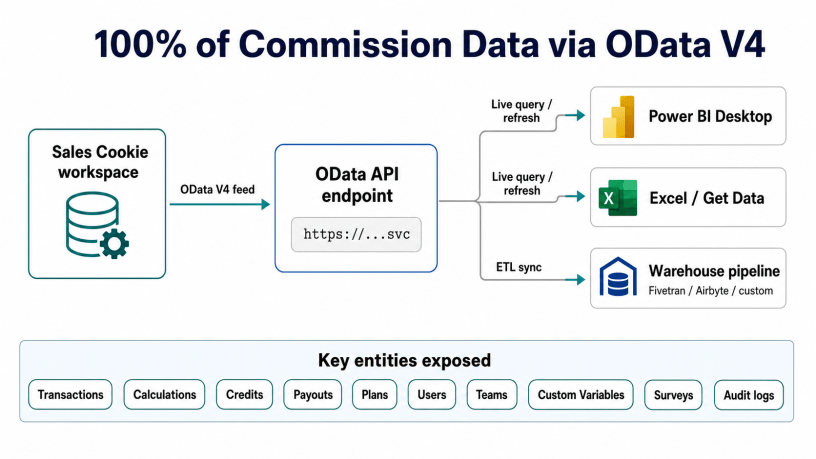
Sales Cookie exposes its commission data through a read-only OData V4 API. Per the API documentation, the API covers transactions, calculations, credits, payouts, plans, enrollments, users, teams, custom variables, surveys, alerts, and workspace settings. Any tool that speaks OData V4, including Power BI Desktop, Excel’s Get Data, Tableau via OData connector, and most warehouse ingestion tools, can pull from it directly. This article walks through what the API exposes, how to authenticate, the practical limits, and three example reports that are easier to build via the API than to wait for as built-in features.
Why an API matters more than another built-in report
Vendor-built reports are necessarily generic because they have to serve every customer. Per the Sales Cookie reporting overview, the platform ships built-in crediting reports, payout reports, and attainment reports out of the box. Those cover 80% of common questions. The 20% that the API addresses is the long tail: finance breakdowns by GL account, customer-specific attribution analyses, plan-cohort comparisons over arbitrary periods, what-if simulations against live data, and tie-outs against the general ledger or revenue subsystem. These reports are not worth building as canned features because every finance team wants them slightly differently. They are exactly worth exposing via API so each team can build them their own way.
The other advantage of API access is that it makes the comp tool a first-class data source for the warehouse. If your company runs analytics through Snowflake, BigQuery, or Databricks, you want commission data in the warehouse alongside Salesforce, billing, and product usage data. OData makes that straightforward: warehouse ingestion tools either support OData natively or can be pointed at the endpoint with a generic HTTP source. Once commission data lands in the warehouse, every downstream BI tool and SQL query has access to it without further integration work.
Authentication and access
OData API access in Sales Cookie is gated behind two facts: the connection has to be configured at the workspace level, and only full admins of the workspace are permitted to query. Per the KB, you configure the connection under Settings > Connections > OData API, which gives you two credentials: an OData service URL and an API key. The URL embeds the workspace identifier, and the key authenticates the request. Both are required on every call.
| Setting | Where to find it | Notes |
|---|---|---|
| OData service URL | Settings > Connections > OData API | Workspace-scoped, embeds the tenant identifier |
| API key | Settings > Connections > OData API | Rotate periodically, treat as a secret |
| Permission required | Full admin role on the workspace | Non-admins cannot query, even with the key |
| Mode | Read-only | No write operations exposed via OData |
| Throttling | HTTP 429 on excessive requests | Back off and retry; aggregate queries server-side where possible |
Read-only is intentional. The commission ledger is the system of record for variable pay, and exposing writes would create a path for downstream tools to corrupt the calculation history. If you need to modify plans, users, or transactions, that goes through the admin UI or the calculation re-run, both of which preserve audit history. The API is for pulling data out, not pushing it back in.
What entities the API exposes
The OData service publishes a metadata document at the standard $metadata endpoint that lists every exposed entity and its fields. The current entity list covers the full commission lifecycle: source transactions, the calculations that processed them, the credits and rewards those calculations produced, and the plans and users that drove the logic. The following groups give a working mental model of what is available.
| Group | Entities | Typical use |
|---|---|---|
| Transactions | Transaction | Source deals before crediting |
| Calculations | Calculation, CalculationCommission, CalculationCredit, CalculationResult | Processed credits, attainment, payouts per period |
| Plans and enrollment | Plan, PlanEnrollment, PlanRole, CatalogEntry | Plan definitions, who is enrolled, role assignments |
| Users and teams | SystemUser, UserAlias, Team, TeamAlias, TeamMember, WorkspaceRole | User and team master data, aliases, memberships |
| Configuration | CustomVariable, WorkspaceSetting | Per-user or per-plan variables, workspace-level config |
| Reporting and feedback | Report, Survey, SurveyResult | Saved reports, rep acknowledgement surveys |
| Audit and operations | Alert, Announcement, EventLog | Audit log, system announcements, alerts |
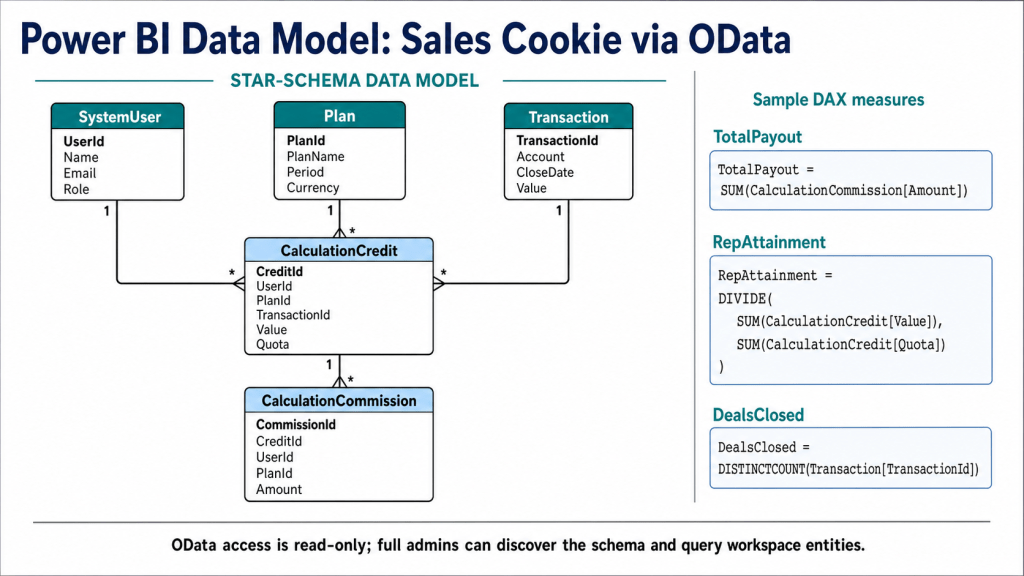
The three entities that finance teams use most are CalculationCredit (which contains every credit assigned by every plan), CalculationCommission (which contains every reward derived from those credits), and Transaction (which contains the original deal). Joining these three answers most “why did this rep get paid this amount” and “which deals drove this period’s expense” questions without writing custom logic.
Example 1: Power BI live dashboard
Power BI Desktop has a native OData feed connector. Get Data > OData feed > paste the URL > basic authentication with the API key > pick the entities you want. Once connected, the entities appear as tables in the data model. Build relationships between CalculationCredit, CalculationCommission, Transaction, and SystemUser, then build measures: total payout by period, attainment by rep, deal count by plan, etc. Here is a conceptual diagram which omits certain entities (ex: Calculation, CalculationResults, Teams, etc.), for illustration purposes.
Refresh cadence is your call. Set the Power BI dataset to refresh hourly during close week, daily during the month, or on demand. Because the API is throttled with HTTP 429 on excessive requests, do not set sub-minute refresh on a dataset that pulls every entity; either narrow the entity set, use OData $filter to pull only changed records (CalculationResults with a recent modified date), or stagger refresh schedules across multiple datasets.
Example 2: Excel pivot against live data
For finance team members who live in Excel, Data > Get Data > From Other Sources > From OData Feed gives the same connectivity inside Excel. The advantage over CSV export is that the workbook refreshes against the live API rather than against a stale snapshot. Build the pivot once, refresh it monthly at close, and the same workbook becomes a permanent finance report. Save it on SharePoint or OneDrive with scheduled refresh and you have a self-updating commission tracker.
The common pattern is to pull CalculationCommission as the fact table, expand related SystemUser and Plan columns, and pivot by period, plan, and rep. Add a calculated column for GL account by joining to CustomVariable if your plans store GL mapping there. The workbook becomes the bridge between commission detail and the journal entries the GL team posts each period.
Example 3: Warehouse pipeline for analytics teams
Larger organizations move commission data into the data warehouse alongside Salesforce, billing, and product data. Once in the warehouse, every downstream tool, dbt model, and BI dashboard has access without point-to-point integrations. The OData feed feeds the warehouse via one of three common paths.
| Path | How it works | When to use |
|---|---|---|
| Ingestion tool with OData support | Tools like Fivetran, Stitch, or Airbyte sometimes support OData sources directly; configure URL + key | Easiest path when supported, minimal custom code |
| Generic HTTP/REST source | Use the ingestion tool’s generic REST connector pointed at OData endpoints with pagination handling | When the tool does not have OData natively but supports generic HTTP |
| Custom script + warehouse load | Python or Node script paginates the OData feed, lands JSON in object storage, COPY into Snowflake/BigQuery | Maximum control, requires engineering ownership |
For the custom-script path, the OData $top and $skip parameters handle pagination, and $filter on a modified-date field lets you pull only new or changed records on each run. A typical schedule is a nightly full pull plus an hourly incremental pull during close week. Land the raw payloads in object storage first so you have a replay-able audit trail, then transform into warehouse tables via dbt or equivalent.
OData query patterns worth knowing
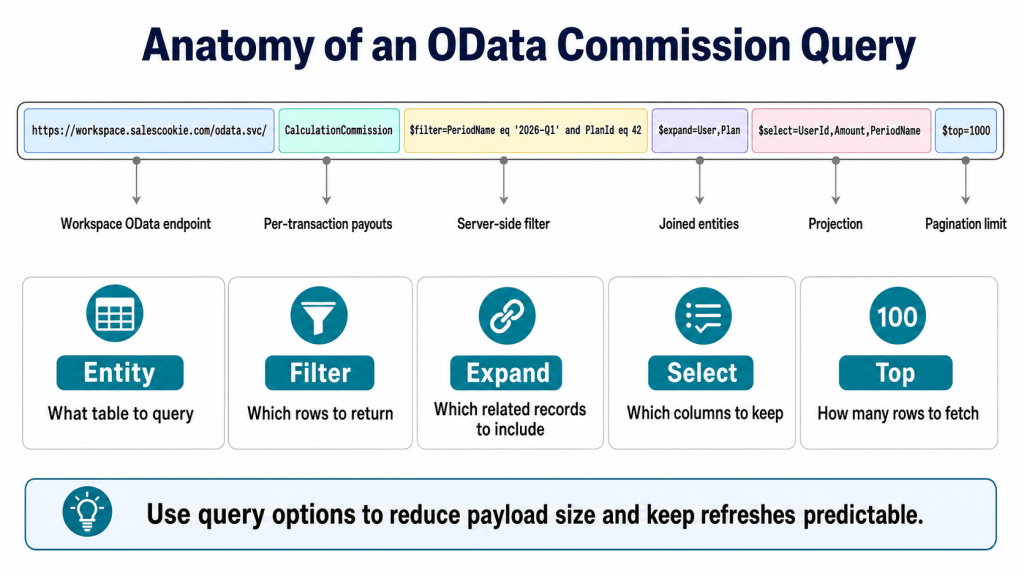
OData V4 supports a small but powerful set of query options that work on every entity. The four most useful for commission reporting are $filter, $select, $expand, and $top.
- $filter narrows the result set server-side. Example:
$filter=PeriodName eq '2026-Q1' and PlanId eq 42. Use this before pulling large tables, both for speed and to stay within throttling limits. - $select returns only the columns you need. Example:
$select=UserId,Amount,PeriodName. Reduces payload size and API round-trip time. - $expand joins related entities in a single call. Example:
$expand=User,Plan. Avoids second-pass lookups when building denormalized tables. - $top and $skip drive pagination. Pull in pages of 1000 records to avoid timeouts and large memory spikes.
- $count=true returns total record count alongside the page, useful for progress logging in pipelines.
Throttling and operational hygiene
The API returns HTTP 429 on excessive requests. The right operational response is exponential back-off with jitter, capped at a reasonable max (60 seconds is typical), with a retry limit and an alert when the limit is hit. Build the retry logic into your ingestion script or set it on the ingestion tool. Beyond retries, the cleanest way to stay under the threshold is to be selective with $filter and $select rather than pulling whole entities every run.
The other operational practice worth setting up early is monitoring on the freshness of the warehouse tables. If the API stops responding, the API key gets rotated, or the workspace admin permission lapses, your pipeline will quietly stall. A simple “last loaded at” check on each table, alerting when freshness exceeds two hours during business hours, catches all three failure modes before finance notices that yesterday’s payouts are missing from the dashboard.
Reports the API unlocks
To make this concrete, here are five reports that customers commonly build via the API because they are not standard built-in features and would be slow to request as one-offs.
| Report | Entities used | Audience |
|---|---|---|
| Commission expense by GL account by period | CalculationCommission, Plan, CustomVariable | Finance, accounting |
| Attainment distribution and quota-to-payout curve | CalculationCredit, CalculationCommission, PlanEnrollment | Sales ops, comp design |
| Top customers driving commission expense | Transaction, CalculationCredit, CalculationCommission | Finance, revenue ops |
| Plan-cohort comparison over multiple quarters | Plan, PlanEnrollment, CalculationResult | Comp design, FP&A |
| Disputed-deal audit trail | Transaction, CalculationCredit, EventLog, SurveyResult | Sales ops, audit |
Each of these is a finite SQL or DAX expression against the entities listed. None of them require any cooperation from the comp vendor beyond the API access already provided. That is the point of exposing 100% of the data: the long tail of reports that no vendor would build as canned features becomes a Tuesday-afternoon project for the analytics team.
When the API is the right answer and when it is not
The API is the right answer when finance, FP&A, or BI teams have specific reporting needs that built-in reports do not cover, when commission data needs to live in the warehouse, or when an external system needs to consume payout data for downstream processing (paystub generation, GL posting, ASC 606 amortization schedules). The API is not the right answer for ad-hoc, one-off questions that a built-in report or saved view can already answer. Reach for the API when the same custom report will be run repeatedly. Use the built-in reports for one-off curiosities.
Related reading
- Inside a Crediting Engine: Why Complex Commission Plans Need More Than VLOOKUP
- Crediting vs. Payment in Commission Plans: The Distinction That Saves Your Audit
- Handling Retroactive Sales Data and True-Ups: A Guide to Ever-Changing Commission Inputs
Sources
- Sales Cookie KB, How can I access sales incentive data using API calls?
- Sales Cookie, Reporting overview
- Sales Cookie KB, How does the crediting engine work?
- OASIS, OData V4 specification

