Reading time: about 15 minutes. A deep dive into what a commission crediting engine actually does, why complex plans need more than spreadsheet VLOOKUP, and how Sales Cookie’s engine handles the cases that break simpler systems.
The crediting engine is the part of any commission system that takes a sales transaction and figures out which person or team gets credit for it. In a one-rep-one-territory world this is trivial: the rep’s name is on the deal, the rep gets the credit. In any real organization above 25 reps, with overlay teams, splits, channel partners, mid-period transfers, multiple data sources, and renaming customers across systems, crediting becomes the single most complicated piece of the calculation pipeline. It is also the piece that, when wrong, produces the worst disputes because the rep can clearly see the deal but does not get paid for it.
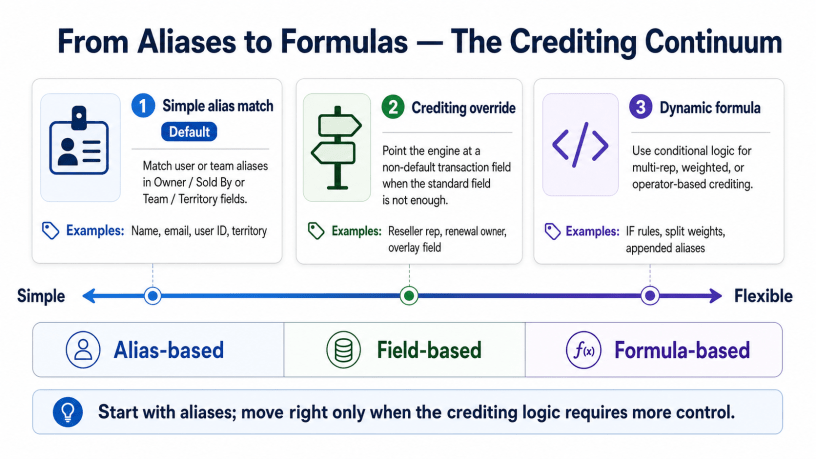
Most commission tools treat crediting as a lookup table. Sales Cookie treats it as an engine: aliases, multiple match categories, indirect crediting via territory, parent-team rollup, dynamic formulas, and explicit splits. The difference matters whenever your plan has any of the complications listed below. This article walks through how the engine works, the simple cases that aliases handle, the advanced cases that dynamic formulas handle, and why the separation of crediting from rewarding is what makes everything else possible.
What a crediting engine actually does
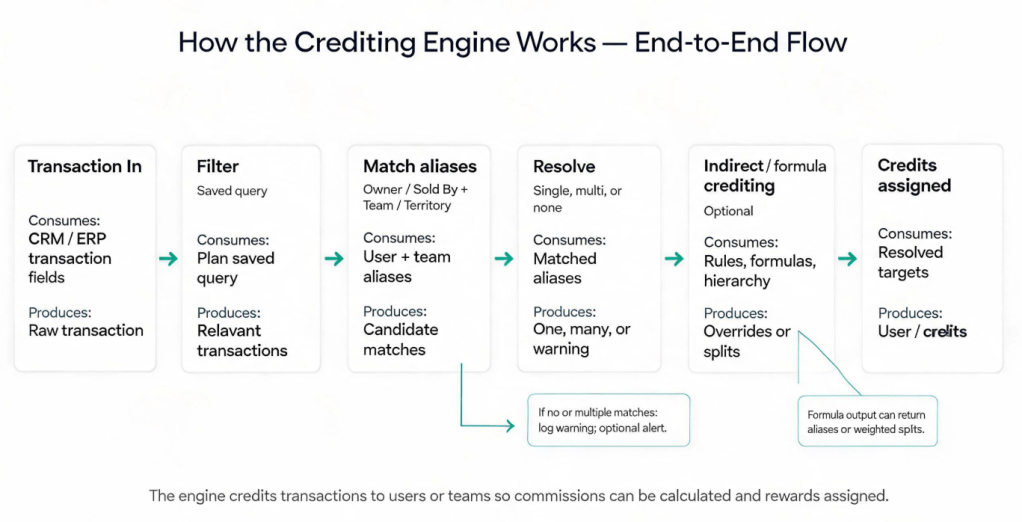
At its core, the crediting engine answers one question per transaction: “Which users and teams should be credited for this, and at what weight?” The output of crediting is a list of credits: who is credited, for what transaction, at what share of the value. These credits are then consumed by the attainment and reward stages downstream. Per the Sales Cookie crediting engine documentation, “the crediting engine processes transactions to credit users or teams so as to measure sales performance.” That sentence hides about ten layers of logic.
The fundamental design choice that any plan has to make: measure performance by individual, or by team. Sales Cookie sets this per plan. If individual, crediting defaults to fields tagged “Owner / Sold By” on each transaction, and the engine uses user aliases to match. If team, crediting defaults to fields tagged “Team or Territory,” and the engine uses team aliases. The same transaction can be processed by multiple plans simultaneously, one measuring individual performance, one measuring team rollup, and the credits each plan produces are independent.
The simple case: aliases
For most transactions, crediting is a lookup. The “Owner” field on the opportunity contains “Maya Chen.” The user record for Maya Chen has aliases including “Maya Chen,” “maya.chen@acme.com,” “MCHEN,” and “User-1023.” Whichever form appears in the transaction, the engine matches it back to the right user record. Per the Sales Cookie alias documentation, aliases can be user names, email addresses, user IDs, team names, territory names, or team IDs. Matching is case-insensitive. Default aliases are created automatically when you add a user or team; you can list additional variants to cover the ways the same person shows up across CRM, billing, HRIS, and channel systems.
This sounds trivial. In practice it is the most under-appreciated feature in the engine because it absorbs every system-of-record naming inconsistency without forcing the data to be cleaned upstream. If your CRM shows reps by email, your billing system shows reps by employee ID, and your channel system shows reps by Salesforce username, aliases let all three feed the same plan without breaking.
| System | Field | Value | Resolves to |
|---|---|---|---|
| CRM (Salesforce) | Owner Email | maya.chen@acme.com | User Maya Chen via email alias |
| Billing (QuickBooks) | Sales Rep | MCHEN | User Maya Chen via initials alias |
| HRIS (Workday) | Employee ID | 10234 | User Maya Chen via employee-ID alias |
| Channel system | Account Owner | Maya C. | User Maya Chen via name alias |
Outcomes the engine has to handle
Aliases would be enough if every transaction always matched exactly one target. They do not. The engine has to handle three outcomes:
- Single match. The transaction’s owner or team field matches exactly one user or team. Standard case.
- No match. The owner field is empty, contains a value not present in any alias, or the rep has since left. The engine can be configured to fire a system alert; regardless, the detailed calculation log records a warning.
- Multiple matches. A value matches more than one user (typically because two users share an alias by mistake). The engine splits as per your own rules, or raises an alert and the admin reconciles.
Each of these outcomes is a fork in the road. A spreadsheet collapses them into “VLOOKUP returned a value” or “VLOOKUP returned #N/A,” with no audit trail. The engine handles each explicitly: alerts on the cases that need attention, logs on every case, handling of complex splits, and policy on whether to credit anyone in the ambiguous cases.
Indirect crediting: when the rep is not in the data
One of the most common real-world cases: the transaction has a territory name but no rep name. Channel deals, inbound web orders, customer-service-driven upsells, lead-routed deals where the routing tool wrote the territory but not the rep. The engine has to credit a person, not a territory.
The indirect-crediting pattern: if no user alias matches, fall back to looking up the team by territory name, then credit the team’s member users. Per the crediting-engine doc, “if no user alias matches a transaction, but the transaction includes a territory name, you could choose to lookup the corresponding team, and then credit its member users.” This is a configurable strategy, not a default, because some teams want the alert instead. But for any organization where a chunk of deals lack an explicit rep, indirect crediting prevents tons of silent miscredits.
Dynamic crediting formulas: the advanced case
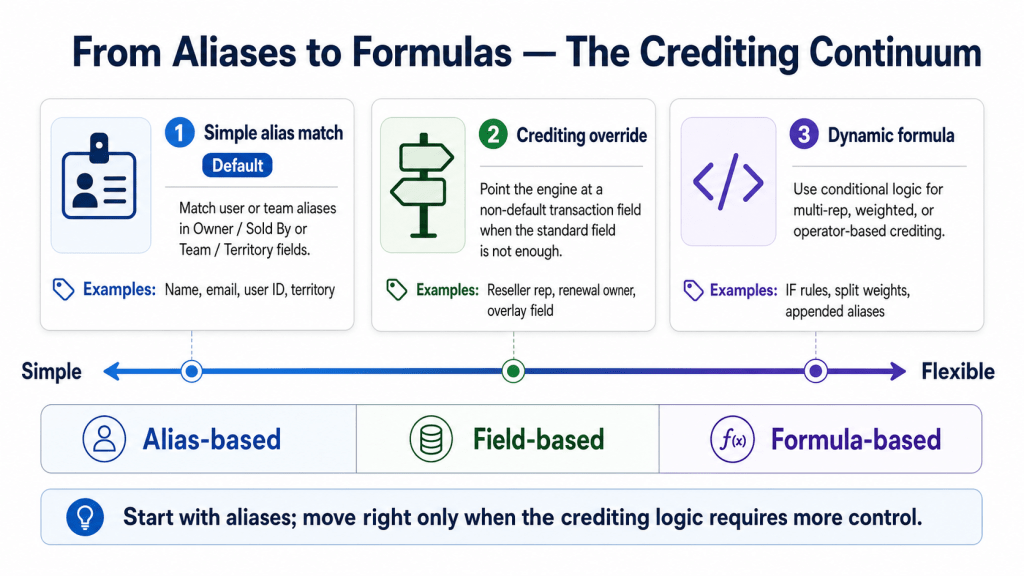
Some crediting rules cannot be expressed as a single-field lookup, no matter how many aliases you add. The classic examples, from the Sales Cookie dynamic crediting formula doc:
- Credit Rep #1 if the deal quantity is over 1000, otherwise credit Rep #2.
- Credit Team A if the deal’s city is Osaka.
- Credit both Rep #1 and Rep #2 when both fields on the transaction are populated.
- Credit reps in a 60/40 split by formula rather than a fixed half-and-half rule.
For these, Sales Cookie supports a formula language with variables, conditionals, string operations, and a default fallback to whatever the standard crediting field would have produced.
Example: credit Rep #1 if quantity is at least 1000, Rep #2 if at least 500, else fall back to the default owner:
var $rep1 = [Transaction].[Rep #1 (Imported)]
var $rep2 = [Transaction].[Rep #2 (Imported)]
var $quantity = [Transaction].[Quantity (Imported)]

IFEX($quantity >= 1000, $rep1)
IFEX($quantity >= 500, $rep2)
[Transaction].[calculated_text]
Or, credit Team A if the city is Osaka, otherwise default:
var $city = [Transaction].[City (Imported)]

IFEX($city = 'Osaka', 'Team A')
[Transaction].[calculated_text]
Credit both reps when both fields are populated, using the `||` separator to indicate multiple credit recipients:
var $rep1 = [Transaction].[Rep #1 (Imported)]
var $rep2 = [Transaction].[Rep #2 (Imported)]

IFEX(LEN($rep1) > 0 AND LEN($rep2) > 0, $rep1 + '||' + $rep2)
[Transaction].[calculated_text]
The formula’s output is text, listing one or more aliases separated by `;` or `||`. The engine resolves each alias through the standard alias lookup, so the formula does not need to know user IDs directly. The fallback `[Transaction].[calculated_text]` returns whatever the default crediting field would have produced, which means a formula is layered on top of the alias system rather than replacing it.
Formula-based crediting splits
Sales Cookie’s standard option for splits is “split equally” between credited users. For more complex weighting, the formula syntax allows explicit weights:
user1[0.4];user2[0.6]
User1 receives 40 percent of the transaction’s value, user2 receives 60 percent. The split engine handles the proportional credit, and downstream attainment and rewards are computed per credit, not per transaction. This is what lets a complex split deal (multi-rep, weighted) flow through to attainment without breaking quota math.
Saved queries: filtering transactions before crediting
Not every transaction in your data warehouse is relevant to every plan. The renewals team should not be credited on new-business deals; the SDR plan should not be credited on closed deals from a different region. Sales Cookie filters at the plan level using saved queries: a stored set of filter conditions applied to the transaction set before crediting runs. The result is that each plan sees only its relevant transactions, which simplifies the crediting math and dramatically reduces false positives in unmatched-transaction alerts.
Combined with effective-date filtering on the calculation period, saved queries ensure that the engine only credits the right rows for the right plan in the right window. This separation of concerns is what makes complex multi-plan environments manageable: each plan owns its filter, and the engine respects it.
Why this matters: the spreadsheet comparison
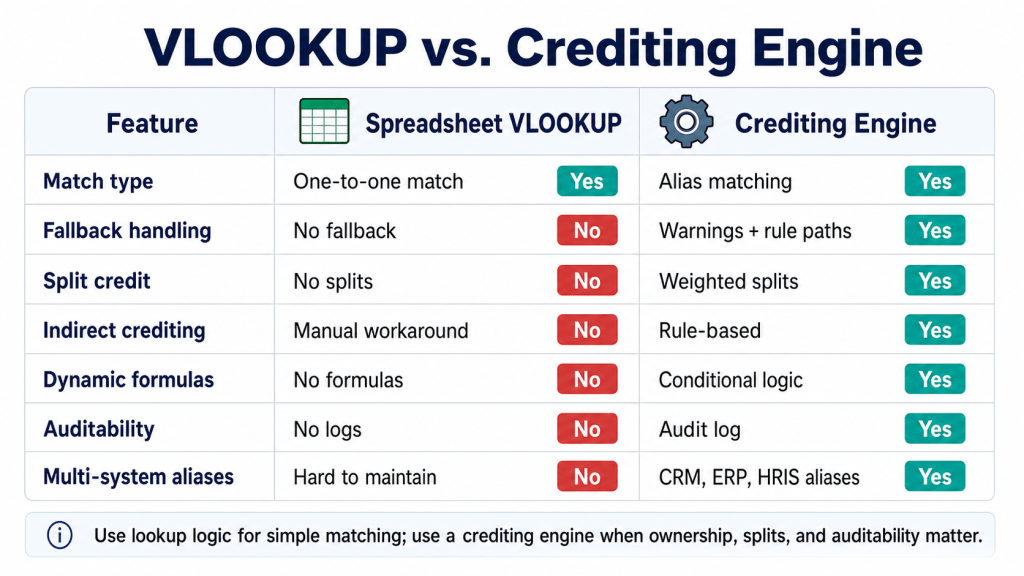
| Capability | Spreadsheet VLOOKUP | Crediting engine |
|---|---|---|
| Match on multiple alias variants per user | Requires preprocessing; brittle | Native; any number of aliases per user |
| Resolve no-match cases with a fallback | #N/A unless wrapped in IFERROR | Configurable: alert, indirect, or formula-driven |
| Handle multi-rep credit on a single deal | Requires manual row duplication | Native splits, equal or weighted |
| Indirect crediting (territory to team members) | Hand-built with nested formulas | Native option on the engine |
| Conditional crediting (depends on quantity, region, product) | Possible with nested IF; fragile | Native: dynamic crediting formula with IFEX |
| Audit log per credit decision | None | Detailed calculation log per transaction |
| Parent-team rollup | Manual hierarchy table | Native option per plan |
| Separation from reward strategy | Conflated | Crediting and rewarding are independent stages |
The separation that makes everything else possible
The deepest design decision in Sales Cookie’s engine is that crediting and rewarding are separate stages. Once crediting has produced its output (a list of credits per transaction per payee), the rewards stage can do anything it wants with those credits: pay the credited user, pay their manager, pay the team’s manager, pay a different cost center, or any combination. The engine documentation puts it this way: “rewards may be assigned to credited users / team members” or, as a different strategy, “to user managers or team managers.”
This separation is what enables the manager-override patterns covered in our adjacent manager override article, the crediting-vs-payment distinction in our crediting vs. payment article, and the pay-when-you-get-paid pattern in our pay-when-paid guide. Each of those plan structures depends on being able to credit one entity and pay a different one. In a spreadsheet world, that decoupling has to be hand-coded with nested lookups and shadow tables. In an engine, it is the architecture.
Bottom line
For small teams with one rep per deal and one data source, a spreadsheet’s VLOOKUP is fine. For everyone else, the crediting engine is where commission software earns its keep. Aliases absorb naming inconsistency across systems. Indirect crediting catches deals that have a territory but no rep. Dynamic formulas handle conditional and split crediting. Saved queries scope each plan to its relevant transactions. And the separation of crediting from rewarding makes the manager-override, pay-when-paid, and team-rollup patterns possible without forcing you to maintain a parallel shadow model. The engine is not a feature; it is the substrate every other complex plan structure rests on.
See the crediting engine work on your data. Bring a real CRM export, a real billing export, and one of your gnarlier plan documents to a 30-minute demo. Book here. Pair this article with our manager override guide, our crediting vs. payment article, and our pay-when-paid guide.
Sources: Sales Cookie – How the crediting engine works; Sales Cookie – What is an alias; Sales Cookie – Dynamic crediting formulas (advanced); Sales Cookie – Deconstructing sales commission software.

