Reading time: about 12 minutes. A 90-day phased migration plan to move sales commissions off spreadsheets and onto a real system, with the data dictionary, shadow-run schedule, cutover checklist, and rollback strategy that prevents the painful version of this project.
Most companies migrate off Excel-based commissions for the same reason: the math has gotten too complicated, the file has gotten too fragile, the disputes have gotten too frequent, and the person who actually understands the formulas is one wrong day away from quitting. The migration project itself is straightforward, but it has a few specific failure modes that cost real money. This guide is the 90-day phased plan that consistently works.
Why most spreadsheet commission programs are quietly broken
Field audits of operational spreadsheets, summarized by Ray Panko’s research, consistently find errors in 86 percent or more of the spreadsheets examined. The European Spreadsheet Risks Interest Group catalogs hundreds of multimillion-dollar spreadsheet errors at public companies. Commission spreadsheets are particularly vulnerable because they combine high transaction volume, multi-tab formulas, hand-key data entry, and small-team ownership. The errors are usually small individually and large in aggregate. The most common pattern is not a catastrophic miscalculation; it is a quiet 1 to 2 percent drift between what was paid and what should have been paid, accumulating over 12 months until someone notices.
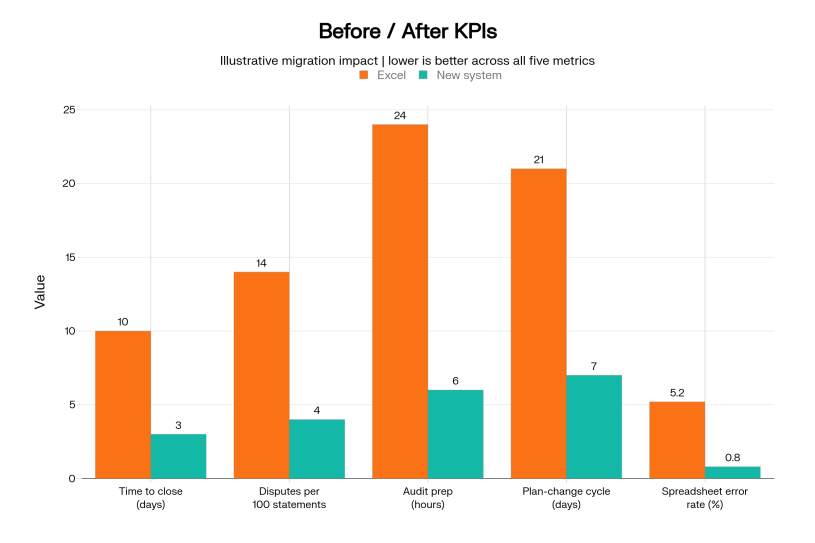
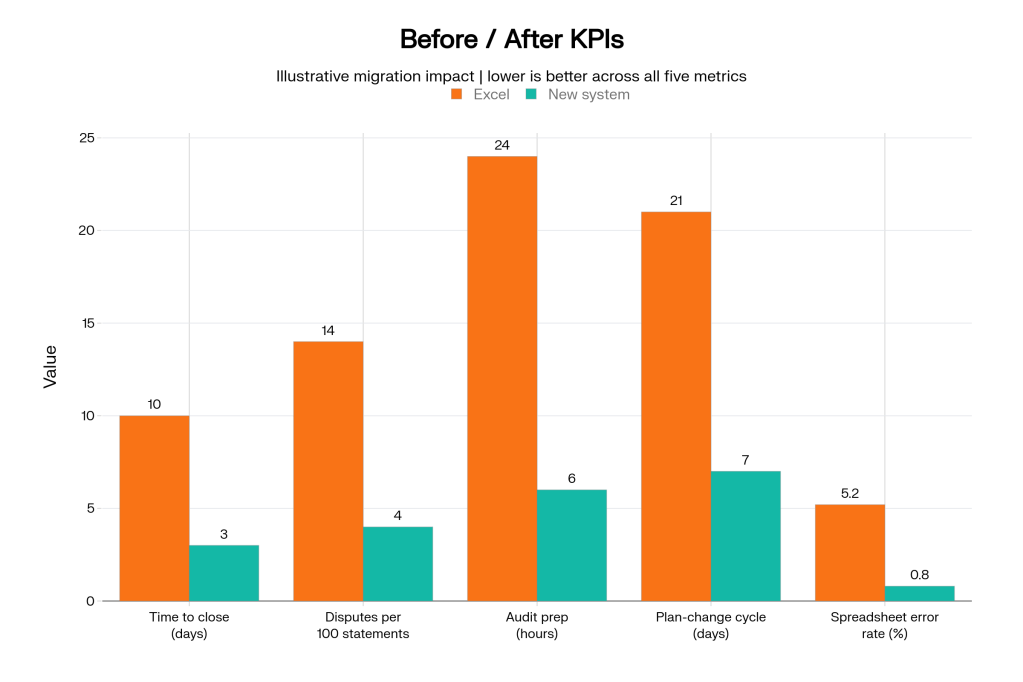
The migration to a real system is justified on three grounds: error reduction, audit defensibility (especially under ASC 606 and 340-40), and time-to-close. Time savings often surprise teams: closing commissions in 2 days at the end of the month instead of 7 to 10 days frees finance for actual analysis.
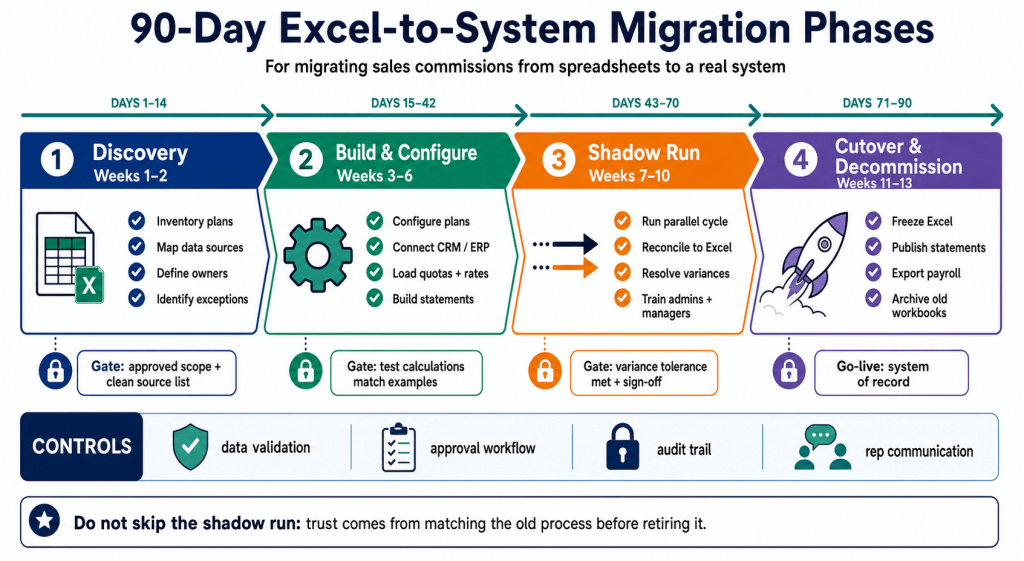
The 90-day plan, by phase
| Phase | Days | Outcome | Gate to next phase |
|---|---|---|---|
| 1. Discovery | Day 1 to 21 | Plan inventory, data dictionary, source systems mapped | Signed-off data dictionary |
| 2. Build & configure | Day 22 to 50 | Plans modeled in new system; data feeds connected; reps loaded | First test calculation matches Excel within 1% |
| 3. Shadow run | Day 51 to 80 | Two full commission cycles run in parallel; deltas reconciled | Two consecutive cycles agree to spreadsheet within $1 |
| 4. Cutover & decommission | Day 81 to 90 | System becomes the source of truth; spreadsheet archived | Reps acknowledge new statements; spreadsheet locked read-only |
Phase 1: Discovery (Day 1 to 21)
Discovery is the phase teams underinvest in and regret. The output is a written data dictionary that defines every input field, every calculation, every plan element, and every edge case currently captured in the existing spreadsheet. Most spreadsheets have at least one formula nobody fully understands. Discovery surfaces that formula and forces a written explanation before migration.
The discovery deliverables:
- Plan inventory. One row per plan variant (role, segment, geography). Captures effective dates, OTE, quota, base commission rate, accelerators, and special conditions.
- Data dictionary. One row per input field. Captures source system, refresh cadence, owner, and what happens if it is missing.
- Calculation map. One diagram per plan showing the dependency tree from raw deal data through final commission. Highlights manual interventions.
- Edge case log. Every special handling case the spreadsheet author currently does manually. These are the migrations risks.
Phase 2: Build and configure (Day 22 to 50)
The configuration phase is the most technical. Plans are encoded in the new system using the data dictionary from Phase 1. Source data feeds are connected (CRM for deals, billing for revenue, HRIS for rep roster). Test calculations are run against historical data and reconciled to the spreadsheet. The reconciliation is the crucial step: any row where the system and spreadsheet disagree is investigated and the discrepancy explained. Most discrepancies are spreadsheet errors. A few are configuration errors. Both must be documented and resolved.
The build phase ends with a documented sign-off: “the system reproduces the spreadsheet’s commissions within an agreed tolerance, and every difference is explained.”
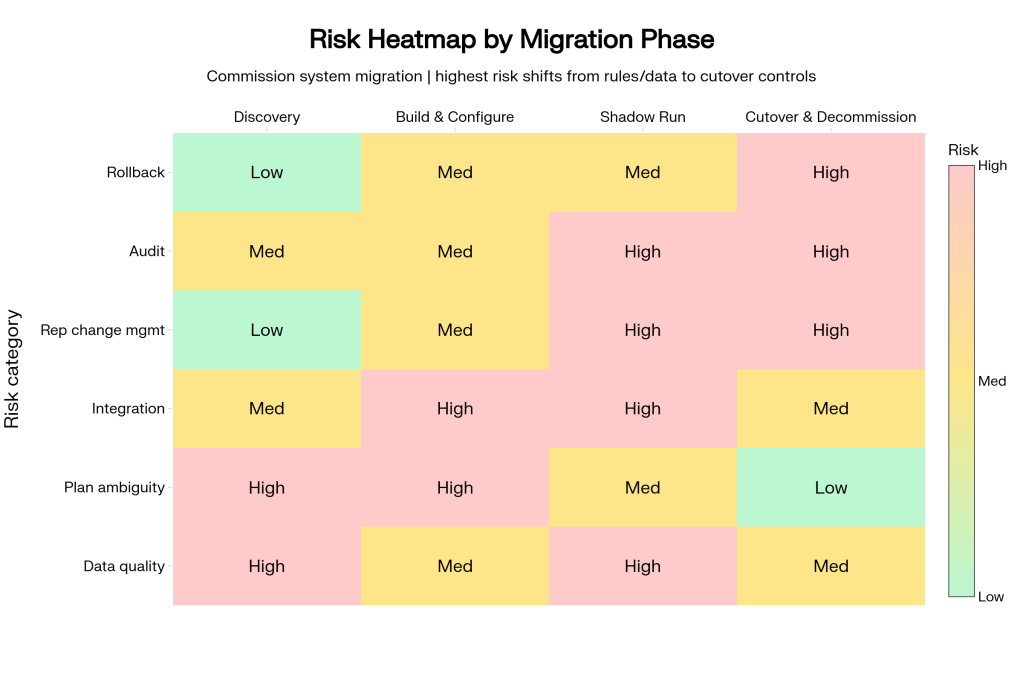
Phase 3: Shadow run (Day 51 to 80)
The shadow run is two consecutive complete commission cycles where the spreadsheet remains the system of record but the new system is run in parallel against the same data. The deltas are reconciled cycle-by-cycle, and any reconciliation gap larger than $1 (one dollar) is investigated.
The shadow run achieves three things. First, it builds confidence that the new system will produce the same answer as the spreadsheet under real production conditions. Second, it gives the comp admin practice using the new system without operational risk. Third, it surfaces edge cases that did not appear in historical test data: the new product SKU added last month, the rep on parental leave, the deal with three splits.
Two consecutive cycles agreeing to within $1 is the gate to cutover. One cycle is luck. Two cycles is a process.
Phase 4: Cutover and decommission (Day 81 to 90)
Cutover is intentionally short and bounded. The system becomes the system of record on a published date. The spreadsheet is locked read-only, archived to a controlled location with version metadata, and never edited again. Reps see the first statement from the new system, which should look familiar (because it matches the shadow run) but may have additional features (transparency, drill-down, audit trail).
The cutover checklist:
- System of record date documented and announced to all stakeholders.
- Spreadsheet locked read-only and archived with version metadata.
- First statement from new system shipped to reps with clear “this is the new statement” announcement.
- Comp admin has dual-system access for 30 days post-cutover for any historical lookup.
- Audit log enabled in the new system from day 0.
- Finance and Sales Ops sign off on the first close from the new system.
Excel vs. real system: feature comparison
| Feature | Excel reality | Real system |
|---|---|---|
| Audit trail | “Last modified by” and ad hoc snapshots | Versioned per cycle, per cell, per user |
| Multi-user editing | Race conditions and version drift | Concurrent edits with role-based access |
| Rep-facing statements | PDF emailed monthly | Always-on portal with drill-down |
| Plan changes | Change formulas in 8 places, hope | Plan editor with version control |
| Data integration | Manual export and paste | Native CRM, billing, HRIS connectors |
| ASC 606 / 340-40 reporting | Manually constructed each quarter | Automatic capitalization and amortization schedules |
| Dispute handling | Email + reply with screenshot | Ticketed workflow with SLAs |
| Time to close | 7 to 10 business days | 2 to 3 business days |
Rollback strategy
A defensible migration always documents a rollback plan, even if it is never invoked. Two principles:
- The Excel file is preserved as a frozen artifact for 12 months post-cutover. If the new system produces a result that needs reconciliation back to historical state, the Excel is there. Read-only.
- The first 30 days post-cutover include a “shadow check” cycle. One last parallel run, then the spreadsheet is decommissioned permanently.
Change management for the team
Migration is a people project as much as a technical one. The comp admin who has owned the spreadsheet for years is often anxious that the new system will eliminate their role. The truth is the opposite: their plan-design knowledge becomes more valuable, not less, because they are no longer absorbed by the manual calculation. The migration narrative should be explicit: this work moves the comp admin from formula-cell-debugging to plan-design-and-analysis.
Reps are a separate audience. They mostly want one thing: their statement to keep arriving on time and to be at least as transparent as before. The migration narrative for reps should focus on what improves: more transparency, faster dispute resolution, in-system drill-down to the deals behind the number. The math is the same. The experience is better.
Readiness checklist
| Check | Status before cutover |
|---|---|
| Data dictionary signed by Sales Ops + Finance | Required |
| Source system feeds connected and refreshing on schedule | Required |
| Two consecutive shadow cycles agree to spreadsheet within $1 | Required |
| Comp admin trained and productive in new system | Required |
| Reps notified of cutover date with sample statement preview | Required |
| Audit log enabled and verified | Required |
| Spreadsheet archive location documented | Required |
| CFO sign-off on first close from new system | Required at month 1 post-cutover |
The Bottom line
The migration off Excel is straightforward when the discipline is right: 21 days of discovery, 30 days of build, 30 days of shadow run, 10 days of cutover. The risk is not the technology; it is the team that tries to compress the timeline and skip the shadow run. The teams that follow the phased plan migrate cleanly and never look back. The teams that skip phases migrate, encounter a surprise, and then spend a year cleaning it up. The 90-day plan is the cheaper option.
Start with our free templates. See our commission spreadsheet templates as a starting point for the data dictionary, then explore Sales Cookie for the migrated state. Pair with our QuickBooks integration guide and our commission nightmares roundup.
Sources: Panko, Audits of Operational Spreadsheets; EuSpRIG Spreadsheet Horror Stories; Panko, Spreadsheet Errors: What We Know; FASB ASC 340-40.
 Sales Commissions Explained